Free tutorial · Requirements traceability · Cameo / CATIA Magic

Requirements traceability matrix in Cameo: find what nobody satisfied or verified.

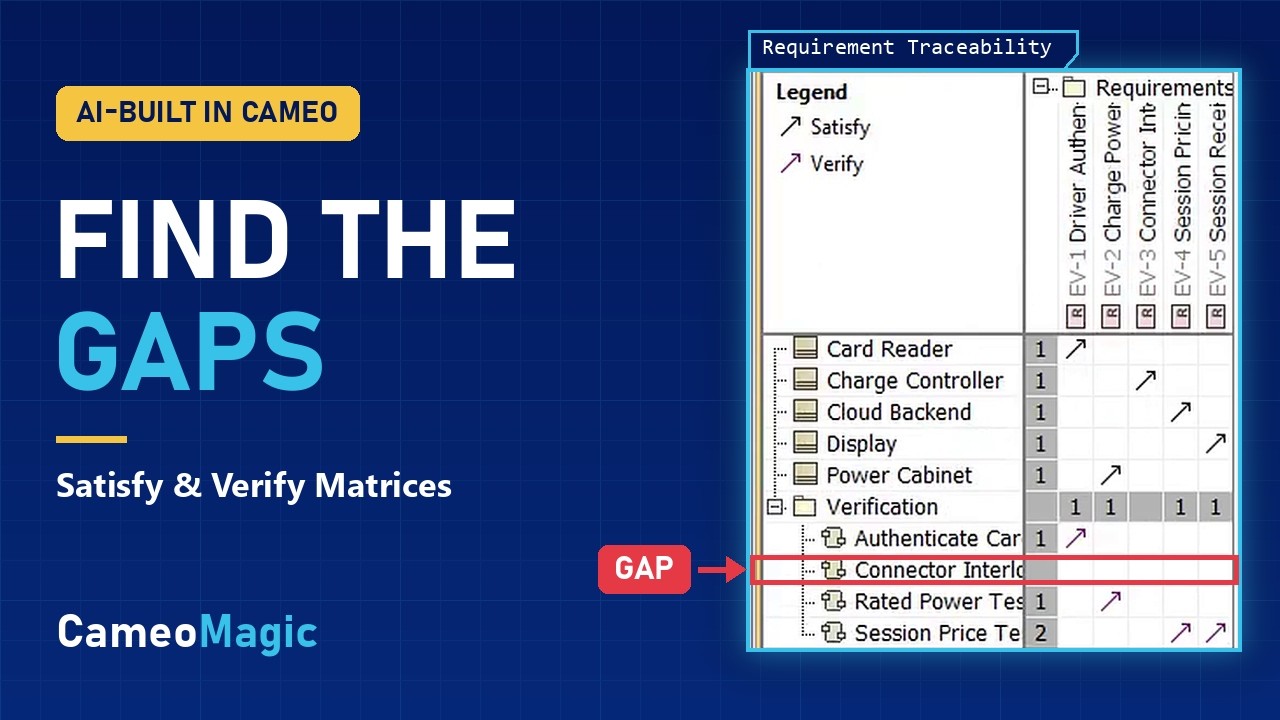
A requirements traceability matrix shows which design elements satisfy each requirement and which test cases verify it. In Cameo, an empty column is a gap you can see. Double-click the empty cell to close it.

Worked example: the EV charging station from our allocation video

Dependency MatrixRequirement Traceability
EV-1Driver Auth.EV-2Charge PowerEV-3Connector InterlockEV-4Session PricingEV-5Session Receipt
Card Reader«block»↗
Power Cabinet«block»↗
Charge Controller«block»↗
Cloud Backend«block»↗
Display«block»no satisfy
Authenticate Card Test«testCase»↗
Rated Power Test«testCase»↗
Session Price Test«testCase»↗↗
Connector Interlock Test«testCase»no verify
↗ black Satisfy↗ violet Verifydashed gap: double-click to close
3 matricesSatisfy, Verify, and one Dependency Matrix for both
1 empty columnis one requirement with nothing satisfying or verifying it
Double-clickan empty cell to create the missing relationship
Built into Cameo and CATIA Magic. No plugins or scripts

Three ways to see traceability

Which matrix answers which question

Cameo ships matrix templates for satisfy and verify. Each one finds one kind of gap. A Dependency Matrix with both criteria puts the whole picture on one screen.

Satisfy Requirement Matrix

Is every requirement designed for?

Blocks against requirements, with an arrow wherever a block satisfies a requirement.

An empty requirement column means nothing satisfies it. In the example, EV-5 Session Receipt.

Verify Requirement Matrix

Is every requirement tested?

Test cases against requirements, with an arrow wherever a test case verifies a requirement.

An empty requirement column means nothing verifies it. In the example, EV-3 Connector Interlock.

Dependency Matrix

Both answers on one screen

Blocks and test cases as rows, Satisfy and Verify as the dependency criteria. Color each criterion so the two kinds of arrow look different.

Every requirement column should end up with at least one black and one violet arrow.

AI-built requirements traceability matrix video thumbnailPREMIERES OCT 27 Video · 8 min SysML requirements traceability in Cameo: find unsatisfied and unverified requirements with matrices

Chapters

  1. 0:00Intro: finding requirement gaps
  2. 0:39Requirements
  3. 2:26Satisfy on the requirement diagram
  4. 2:55Test cases and verify
  5. 4:12Satisfy Requirement Matrix
  6. 5:02Closing a gap in a matrix cell
  7. 5:17Verify Requirement Matrix
  8. 6:08The alternative: one Dependency Matrix
  9. 6:48Telling satisfy from verify
  10. 7:39Recap

How to

Build a requirements traceability matrix in Cameo

The same steps as the video, on the EV charging station: five requirements, five blocks and four test cases.

  1. Write the requirements

    Create the requirements in a Requirements package and give each one an id and its text: EV-1 Driver Authentication through EV-5 Session Receipt.

  2. Draw satisfy relationships

    On a requirement diagram, draw a satisfy from each block to the requirement it satisfies. Card Reader satisfies Driver Authentication, and Power Cabinet satisfies Charge Power.

  3. Add test cases and draw verify relationships

    Create the test cases in a Verification package, then draw a verify from each test case to the requirement it verifies. One test case can verify more than one requirement: Session Price Test verifies two.

  4. Create a Satisfy Requirement Matrix

    Use Cameo's Satisfy Requirement Matrix template. Blocks and requirements meet in a grid, with one cell for each pair.

    Set the row element type, or the matrix shows no rows at all.
  5. Find the empty columns and close them

    A requirement with an empty column has nothing satisfying it. Double-click the empty cell where the right block meets it, and Cameo creates the satisfy relationship.

  6. Repeat with a Verify Requirement Matrix

    Test cases against requirements. An empty column is a requirement no test case verifies yet.

  7. Combine them in one Dependency Matrix

    Make blocks and test cases the rows, and add Satisfy and Verify as the dependency criteria. Both draw the same arrow, so open Dependency Criteria, click the Style column for each criterion, and pick a color. We use black for Satisfy and violet for Verify.

Reading

  • How do I review hundreds of requirements fast in Cameo?Live
  • Dependency matrix vs relation map: which should I use in Cameo?Publishes May 11, 2027
  • How do I build custom traceability views in Cameo?Publishes May 25, 2027
  • How do I model requirements traceability in SysML?Publishes Jun 15, 2027

Project files

EV Charging traceability model · $2.99The model the matrix video builds, with its Satisfy and Verify matrix. Available when the video premieres Oct 27.
Trace relationships across table columns · $1.99The model from the table-columns video, with the traceability matrix. Requirement with textual constraint · $4.99The model from the subscriber-question video.

Questions

Traceability matrix questions

What is a requirements traceability matrix in Cameo?

A matrix view that shows requirements against the elements related to them. Cameo has Satisfy and Verify Requirement Matrix templates, and a general Dependency Matrix you can set up with any relationship types.

What's the difference between satisfy and verify?

Satisfy goes from a design element, usually a block, to the requirement it meets. Verify goes from a test case to the requirement it proves. A requirement needs both to be fully traced.

Why is my matrix empty?

Check the row element type. If it isn't set, the matrix shows no rows at all.

How do I tell satisfy from verify in one matrix?

Both criteria draw the same arrow by default. Open Dependency Criteria, click the Style column for each criterion, and give it a color. We use black for Satisfy and violet for Verify.

Can I create relationships from the matrix?

Yes. Double-click an empty cell and Cameo creates the relationship. In a Dependency Matrix with several criteria, it asks which one to create.

Should I use a matrix or a relation map?

Use a matrix to find gaps across many requirements at once. A relation map is better for following one element's relationships several levels deep.

Does this work in CATIA Magic?

Yes. Cameo Systems Modeler and CATIA Magic are the same software under different names, and the matrices work the same way.

CameoMagic is an independent company with no affiliation with, sponsorship by, or endorsement from Dassault Systèmes. CATIA and Cameo are trademarks of Dassault Systèmes or its subsidiaries.

Every requirement satisfied. Every requirement verified.

Watch the video when it premieres on Oct 27, learn traceability hands-on in SysML Fundamentals, or have us review your model for free.

Prefer email? Write to consulting@cameomagic.com

Free model review

Tell us about your model and we’ll follow up to set up your free 30-minute review.

What do you need?
Please don't include CUI, export-controlled or classified information.